

Stock analysis in Codex with Fair Value Calculator
FVC valuations in Codex: one command, sign in once.
- Server address (MCP)
https://www.fairvalue-calculator.com/mcp - You need
- Codex on your computer (included in every ChatGPT plan) and a Fair Value Calculator account (free, you create it with your email address while connecting). Your plan and its limits apply here too.
- Time
- about 1 minute
- Sent to the AI
- only the valuation for your question, never share counts, entry prices or notes
Free: 3 full verdicts a day and a watchlist of up to 10 stocks. Pro: 50 a day, a larger watchlist and the email alert from the chat. It is the same Pro as on the website and applies right away to your connected account. Try Pro: first month $1
How to connect Codex step by step
codex mcp add fair-value-calculator --url https://www.fairvalue-calculator.com/mcp
- Open a terminal and paste the command above.
- If no browser window opens to sign in afterwards, run: codex mcp login fair-value-calculator
- In the browser, sign in with your Fair Value Calculator account (or create a free one with your email address) and click "Connect".
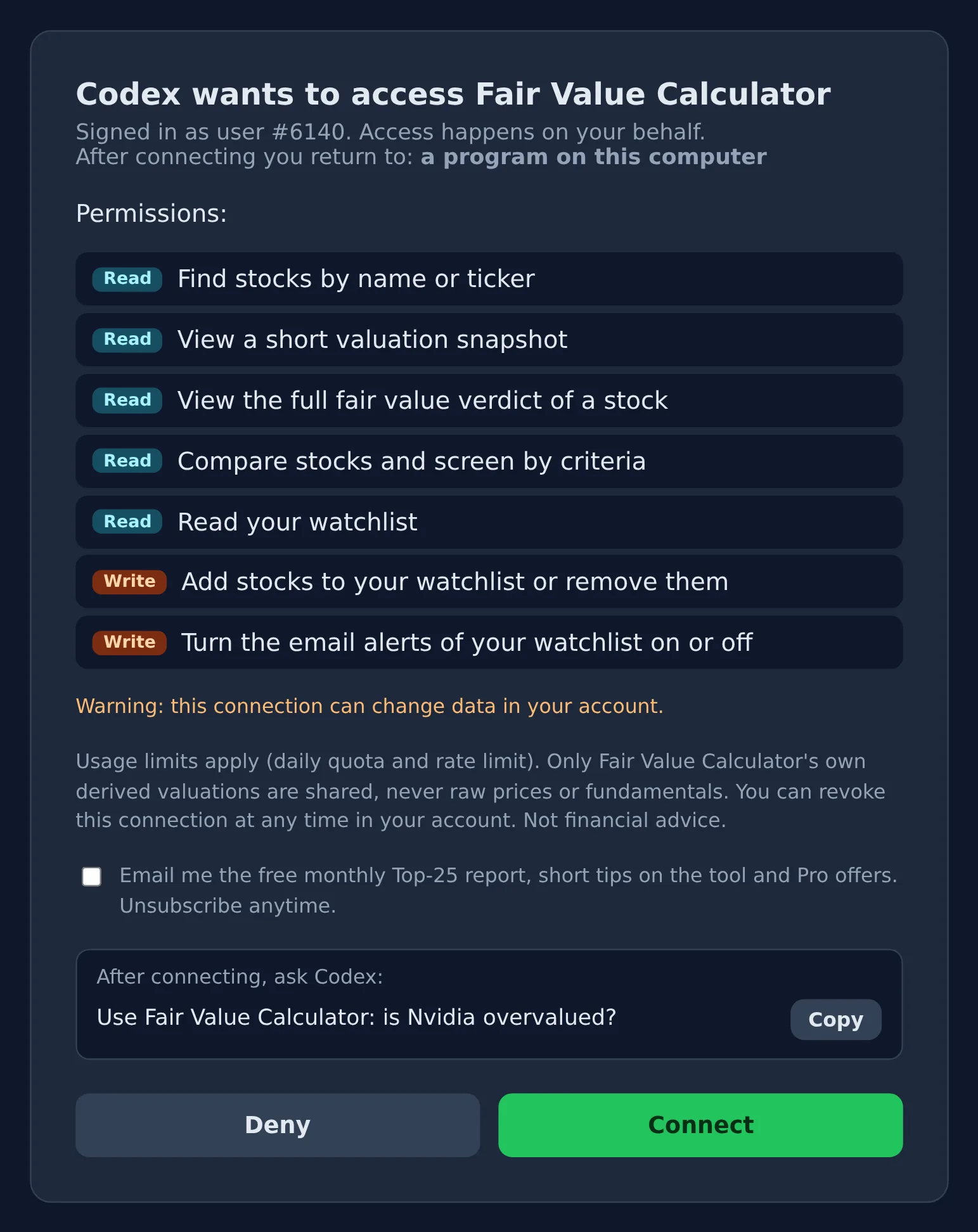
- Start Codex, check with /mcp that fair-value-calculator is connected, and ask: "Evaluate Apple with the Fair Value Calculator".
- On a machine without a browser: codex mcp login fair-value-calculator --no-browser and open the printed link elsewhere.
- The same entry also works in the Codex extension for VS Code and in the ChatGPT desktop app, they read the same settings.
Last verified: Nov 8, 2026.
Example prompts
Ask in your own words. If Codex does not use the connection by itself, add "with the Fair Value Calculator".
What Codex can do afterwards
What an answer contains, all limits for Free and Pro, and more example questions →
Watchlist and alert work on your account. You agree to this separately when connecting, and your AI only changes something on your explicit request. If you were connected before, disconnect once and connect again.
Questions about Codex
What does Fair Value Calculator cost in Codex?
Nothing on our side: a free account is enough and gives you 3 full verdicts a day and a watchlist of up to 10 stocks. Pro allows 50 a day, a larger watchlist and the email alert from the chat; it is the same Pro as on the website. For Codex itself, the vendor's own plans apply.
Does it work in every project?
Yes. The command adds it to your Codex settings (~/.codex/config.toml); they apply to all folders and also to the Codex extension in VS Code.
What does Codex see of my account?
Only the results needed for your question, for example the fair value, verdict and quality of a stock, no raw data and no complete database. Your watchlist only if you allow it when connecting, and without share counts, entry prices and notes. Codex can change it only on your explicit request.
Does Codex calculate the fair value itself?
No. The fair value, range, verdict and quality score come from Fair Value Calculator's own calculation; Codex fetches them from us and explains them. Each answer links to the full analysis on our site.
How do I disconnect again?
Any time in your Fair Value Calculator account under "Connected AI assistants" (fairvalue-calculator.com/account/ai-connections), access ends right away. You can also remove the entry in Codex.